간만에 집에서 플러터 공부나 해볼까 했는데..
플러터 프로젝트를 신규 생성했더니
플러터 의사 불러오랍니다..
왜??? 몇주 전 까지는 닥터에 아무런 문제가 없었는데? 갑자기???
그래서 돌려보니..
PS E:\coding\*****> flutter doctor
Doctor summary (to see all details, run flutter doctor -v):
[√] Flutter (Channel stable, 3.7.0, on Microsoft Windows [Version 10.0.22621.2134], locale ko-KR)
[X] Windows Version (Unable to confirm if installed Windows version is 10 or greater)
[√] Android toolchain - develop for Android devices (Android SDK version 34.0.0)
[√] Chrome - develop for the web
[√] Visual Studio - develop for Windows (Visual Studio Community 2022 17.6.5)
[!] Android Studio (version 2022.2)
    X Unable to find bundled Java version.
[√] Connected device (4 available)
[√] HTTP Host Availability
이런 자바..
갑자기 튀어나와서 또 못살게 구네..!!!

해결 방법은 의외로 간단하다.
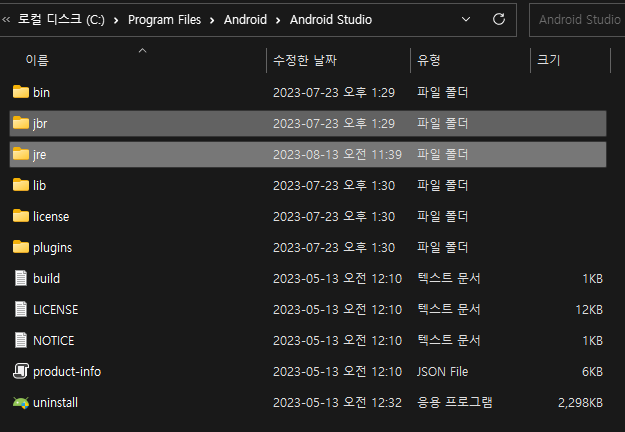
C:\Program Files\Android\Android Studio 설치 경로에서
jbr 폴더에 모든 파일을 복사해서 jre 폴더에 붙여넣기 해주면..
PS E:\coding\******> flutter doctor
Doctor summary (to see all details, run flutter doctor -v):
[√] Flutter (Channel stable, 3.7.0, on Microsoft Windows [Version 10.0.22621.2134], locale ko-KR)
[X] Windows Version (Unable to confirm if installed Windows version is 10 or greater)
[√] Android toolchain - develop for Android devices (Android SDK version 34.0.0)
[√] Chrome - develop for the web
[√] Visual Studio - develop for Windows (Visual Studio Community 2022 17.6.5)
[√] Android Studio (version 2022.2)
[√] Connected device (4 available)
[√] HTTP Host Availability
끄읏..
'코린이' 카테고리의 다른 글
| iOS 디바이스 시뮬레이터 갑자기 안될 때 (error: Failed to halt process: Halt timed out. State = running Error launching application...) (0) | 2023.08.07 |
|---|---|
| Error: Unable to find git in your PATH. (0) | 2023.07.23 |
| 안드로이드 스튜디오 시뮬레이터 빌드(app\build.gradle) 에러 (0) | 2023.05.08 |
| 맥북(Mac M1) iOS 시뮬레이터 에러 (0) | 2023.05.08 |
| iOS 16.4 그리고 Xcode 14.3 업데이트 후 iOS 시뮬레이터 오류 해결 (0) | 2023.04.04 |

